

Insights
Practice insights
from your own sessions
Practice insights in Sessio show how you run sessions: how much you and the client talk, which questions you ask, how you respond when a client voices a feeling and which skills come up most. The data comes from your session transcripts and is compared only with you. There are no ratings, only observations to think about.
Sessio app for Mac with Apple Silicon. Sessio is free during the beta.
How much you talk
Your share of the talk time over 1, 3 or 6 months, and the clients you talk with more or less than usual.
How you lead the dialogue
Open and closed questions, reflections, explanations and advice, with examples from your own sessions.
Skills by week
Up to ten skills: in how many sessions of the week each one came up. A description, not an assessment.
How it looks
The Insights tab
on fictional data
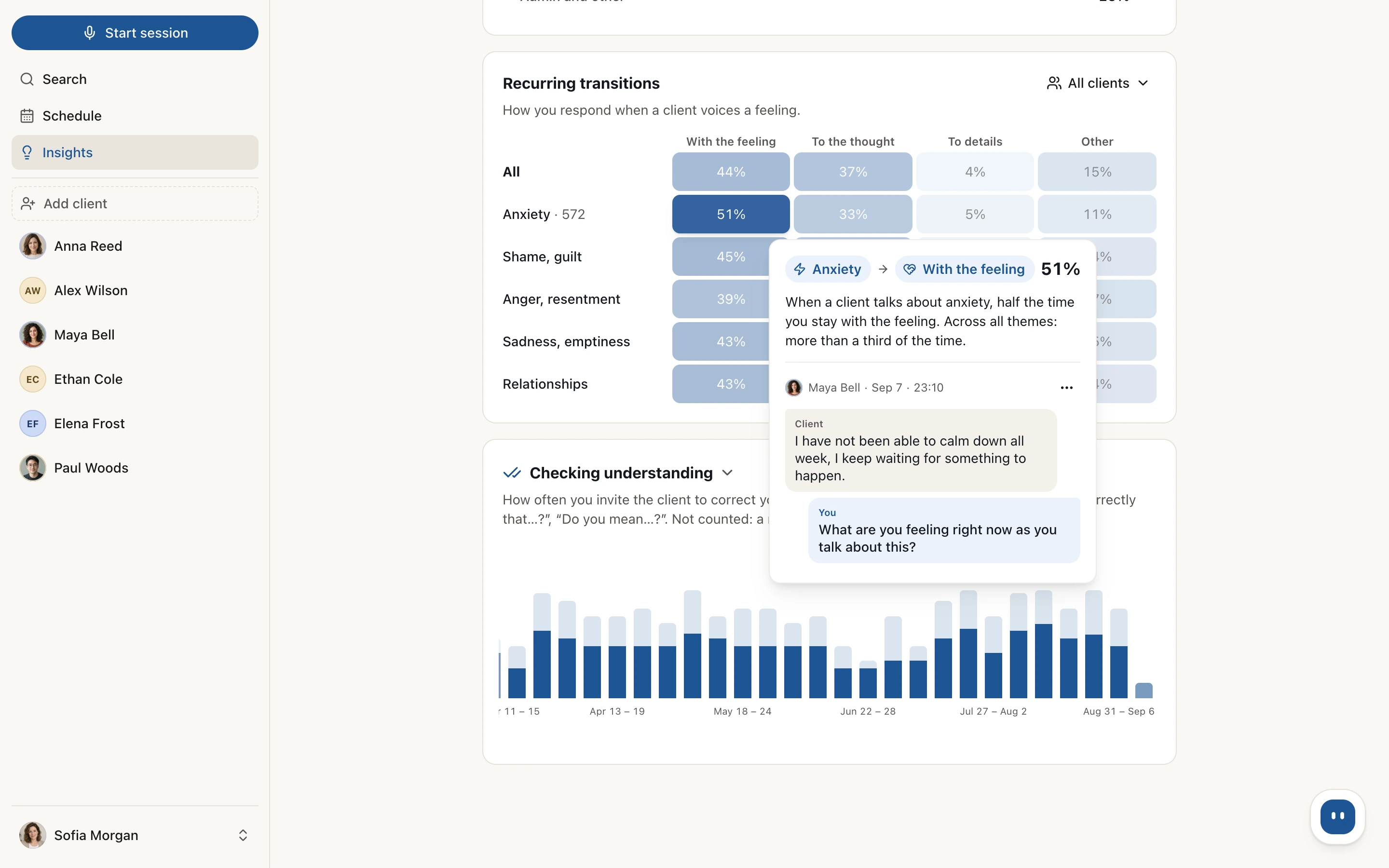
A fragment of the tab: the Recurring transitions table with a hint on one cell, and below it weekly bars for the Checking understanding skill.
What is counted
What the tab shows
and how it is counted
Each block describes what was said in your sessions and opens with a short line you can read at a glance.
| Block | What is counted and what you see |
|---|---|
| Summary | Hours per week, number of sessions, average length and number of clients for the period, with the change from the previous period of the same length. A tile expands into bars by week or month. |
| How much you talk | Your average share of talk time. Clients with at least three sessions in the period are split into "More than usual" and "Less than usual"; usual means your own typical range. |
| How you lead the dialogue | The mix of your turns: open questions, closed questions, reflections, explanations, advice, and admin and other. Short "mm-hm"s are not counted. Each type has examples, and the "All clients" filter narrows it to one client. |
| Recurring transitions | What you do right after a client voices a feeling: stay with it, move to a thought, to details or elsewhere. Rows follow the theme of the feeling: anxiety, shame and guilt, anger and resentment, sadness and emptiness, relationships. |
| Skills | General: checking understanding, reflecting and summarizing, asking for feedback, agreeing on direction, tension in the relationship. Gestalt: here and now, bodily experience, feelings and needs, what happens between you, experiment. Weekly bars show in how many sessions a skill came up. |
| Examples from your sessions | Rows, cells and bars open examples from the recording, with the client's name, the date, the time and a jump to that place in the transcript. Press "Not a match" and the example drops out of the count. |
How it works
From a session to observations
in the background while you work
Insights are built on session transcripts. After each transcript Sessio labels your turns in the background and updates the blocks.
While sessions are being processed the block says "Analyzing sessions" and shows how many are done. This usually takes under an hour.
- Record or upload. Record a session in Sessio on a Mac or upload a finished file. The transcript needs both therapist and client lines.
- Labelling in the background. Sessio marks the type of each of your turns and finds the moments when a client voices a feeling. Talk share is counted from the timing of the lines.
- The Insights tab. Open Insights in the sidebar (⌘I) and choose a period: 1, 3 or 6 months. Blocks open as sessions add up: dialogue from five sessions in the period, talk share from six, transitions from eight.
- Examples and marks. Hover over or press a row or cell to see examples from the recording. If an example does not fit, press "Not a match" and it leaves the count.
Limits
What Insights show
and what they do not promise
Insights describe what was said in your sessions. They are observations to think about, not an assessment of your work.
Show
- Your share of the talk time and the mix of your turns over 1, 3 or 6 months.
- A comparison only with you: with your average, the previous period and your other clients.
- Up to ten skills by week: in how many sessions of the week each one came up.
- Examples from the recording with the date, the time and a jump to the transcript.
- The "Not a match" mark: a marked example leaves the count.
Do not promise
- Ratings, scores, rankings, norms of what is "right" or a comparison with other therapists: Insights have none of these.
- Error-free labelling: turns are labelled automatically and can be classed wrongly. The labelling was tried on a small set of sessions in Russian and Ukrainian and has not been checked in other languages, so check the examples.
- A conclusion from an empty result: "no episodes found" does not mean the skill was absent.
- Skills for CBT or other approaches: for now there are general and Gestalt skills, and the Gestalt ones appear if that approach is in your profile.
- All ten skills at once: "Tension in the relationship" appears when the period holds at least five episodes.
- Therapy recommendations or conclusions about a client: Insights describe only your own work.
Checked against Sessio 0.35.0, 1 November 2026.
Nearby
Insights
are built on your sessions
Where the data comes from and what sits next to it.
Questions
Practice insights: answers
What the tab shows, where the data comes from and how many sessions it needs.
What are Insights in Sessio?
Insights are a Sessio tab that, from your session transcripts, shows how much you talk, how you lead the dialogue, how you respond to a client's feelings and which skills come up in your practice, from a list of up to ten. It arrived in version 0.33.0 and opens from the sidebar or with ⌘I.
Do Insights evaluate my work?
No. Insights describe what was said in your sessions and compare only with you: with your average, the previous period and your other clients. There are no scores, rankings, norms of what is "right" or comparisons with other therapists. They are observations to think about, not a diagnosis or a recommendation.
Where do Insights get their data?
From your session transcripts. After a transcript is ready, Sessio labels the turns automatically: the type of each of your turns, the moments when a client voices a feeling, and the skills. For that, the transcript text is processed by external services, which the privacy policy lists. Sessions of different therapists are not mixed.
How many sessions do Insights need?
The first blocks appear after five transcribed sessions in the chosen period. "How you lead the dialogue" opens from five sessions, "How much you talk" from six and "Recurring transitions" from eight. While data is thin, the block shows how many sessions it already has, and you can pick a longer period.
Which skills does the tab show?
The tab shows up to ten skills: five general and five Gestalt. General: checking understanding, reflecting and summarizing, asking for feedback, agreeing on direction, tension in the relationship. Gestalt: here and now, bodily experience, feelings and needs, what happens between you, experiment. The Gestalt ones appear if that approach is in your profile. There are no CBT skills yet.
Who sees my Insights?
Only you. In the app, Insights are calculated from the sessions of your account and only you see them, together with the examples from the recordings.


Insights
Start with a few sessions
Install Sessio on a Mac with Apple Silicon, record sessions or upload finished files. The first blocks appear after five sessions in the period. Sessio is free during the beta.