

Client portrait
Client records for therapists:
one portrait from all sessions
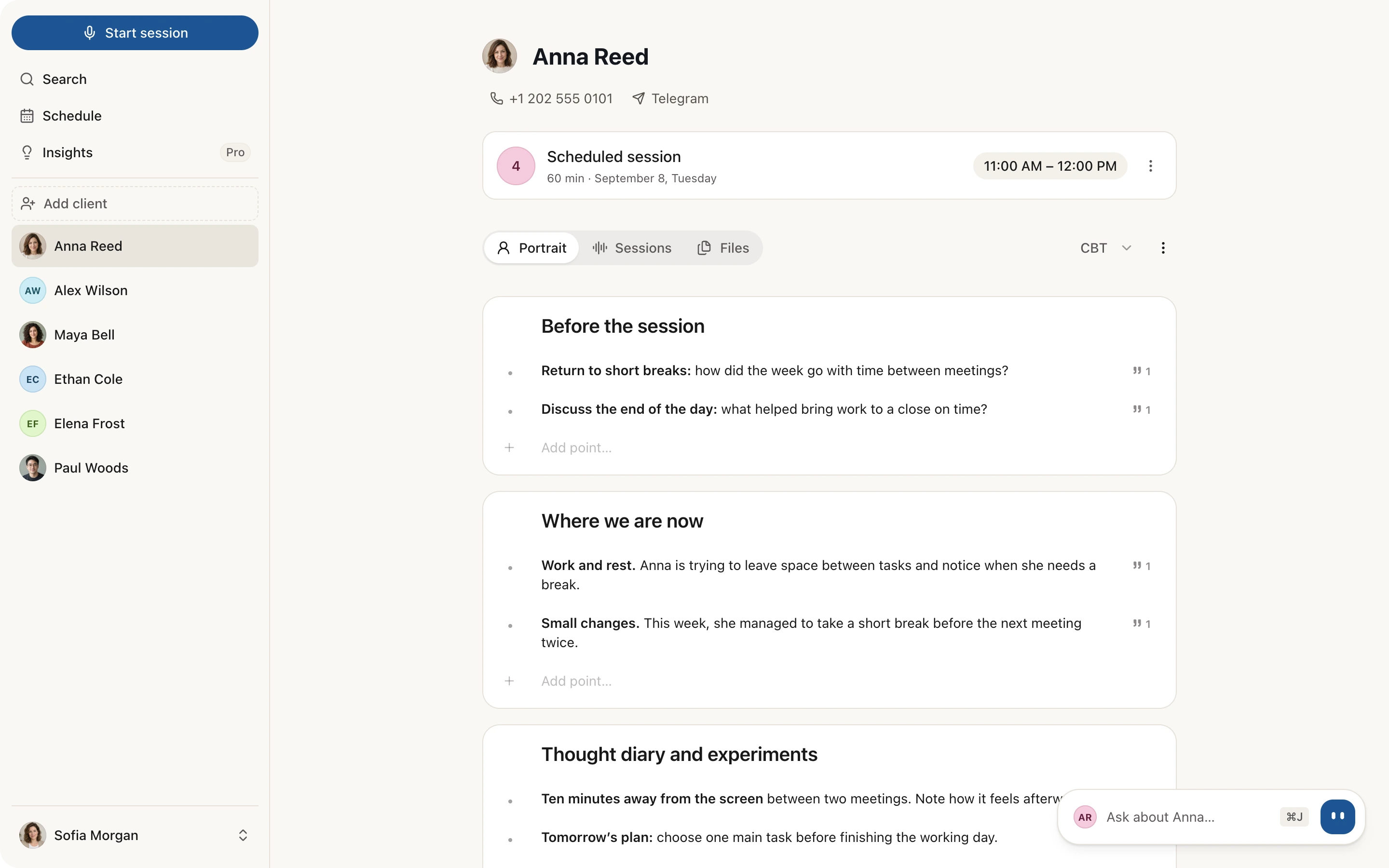
The client portrait in Sessio is a tab on the client's page that gathers context from processed sessions and uploaded files into sections. Points based on a recording have a source icon that leads to the session fragment. The portrait grows after every new session. It summarizes what has already been said and is not a diagnosis.
Mac with Apple Silicon. Sessio is free during the beta.
Sessions and files
The portrait draws on processed sessions and on the files you upload: PDF, DOCX, TXT, CSV and images.
Sources you can open
A point based on a recording has a source icon that opens the session fragment it is built on.
It grows, you edit
Every new session adds points and the earlier ones stay. You can write, edit and reorder points yourself.
How it looks
The Portrait tab
on the client's page
A page of a fictional client. The Portrait, Sessions and Files tabs and the choice of method (CBT) are at the top, the sections with points and source icons are below.
What is in the portrait
The portrait sections
and where the data comes from
The portrait is made of sections. By default Risks, Agreements from last session, Where we are now and one or two sections of your approach are on; the rest are added with "Add other section".
| Section | What it holds and where it comes from |
|---|---|
| Risks | Signals from the transcripts. Always the first section and it cannot be hidden. Sessio only shows signals; whether something counts as a risk is up to you. |
| Agreements from last session | Open agreements and the plan from the last session's note. The block reads the note directly: a point marked as done on the recording screen or in Sio drops out. |
| Where we are now | A snapshot of the last 3-5 sessions: theme, key moment, trajectory. |
| Sections of your approach | Each of the 27 approaches has its own sections: some are on from the start, the rest you add. CBT has "Cognitive profile", "Thought diary and experiments" and "Measures and treatment plan", ACT has "Values and committed action". The approach is shown next to the tabs; if you have several, you can switch. |
| Before the session, Session focus, Open loops | What to check at the next meeting: a 3-minute checklist, one sentence of focus, unclosed topics and promises. You turn them on when you want them. |
| Who this person is, Client's language | Brief context, presenting request and background; verbatim quotes, the words the client uses for their experience. |
| My notes | Your hypotheses and countertransference. A private section that only you write: Sessio adds nothing to it. |
| Sensitivity zones, Medications, Engagement | Signal sections: they appear in the portrait by themselves when the materials have something to show for them. |
How it works
From the first session
to a portrait that grows
The portrait builds itself once the first session is processed; after that, new sessions and files update it. You can keep working in the app: a progress card shows the stages.
To refresh it by hand, use "Regenerate" in the ⋮ menu for the whole portrait or "Regenerate section" for one section. The points you wrote or edited stay.
- First session. Record a session or upload a finished recording. Until the first session is processed, the tab says the portrait will appear after the first recording. When processing ends, Sessio builds the portrait itself.
- Client files. On the Files tab press "Upload" and add intake forms, past notes, documents or images. After processing, Sessio uses their contents in the portrait.
- Every new session. After a new session the portrait updates: the line "Updating the portrait with the new session…" appears, new points are marked "New" and the earlier ones stay in place.
- Check and edit. Where a point has a source icon, open it and compare it with the quote. Add your own points, edit the wording, hide a section you do not need and export the portrait to PDF or Markdown from the ⋮ menu.
Limits
What the portrait does
and what it does not promise
The portrait is a summary of what has already come up in your sessions and files. It does not replace your clinical assessment.
Does
- Gather themes, agreements and changes from all of a client's processed sessions and files in one place.
- Show the source of points based on a recording: the icon leads to the quote and the session fragment.
- Adapt the sections to the client's approach and add points after every session.
- Let you write, edit, reorder and delete points and hide sections; your points stay when the portrait is refreshed.
- Export the portrait to PDF and Markdown.
Does not promise
- Make a diagnosis or draw conclusions about the client: the clinical assessment stays with you.
- Remember everything: recent sessions are read in full, earlier ones through their short summary. If there is too much material, Sessio warns that the portrait did not use all of it.
- Know what is not in the materials: where a section has no confirmed information it says "Not found in the sources".
- Be a client or medical record: it is a working summary for you, not an official document.
- Work offline: the texts of sessions and files are processed by external services, listed in the privacy policy.
Checked against Sessio 0.35.0 and the app help, 1 November 2026.
Nearby
The portrait
is a client's story in one place
What comes before the portrait and what to do with it next.
- TranscriptionHow Sessio turns a recording into text split by speaker, the base for the points with sources.Read more
- Session prep and client recapA reminder of the last session and preparation for the next one, and a recap for the client.Read more
- Practice insightsA view of the whole practice rather than one client.Read more
Questions
Client portrait: answers
What the portrait contains, where it gets its data and what you can edit.
What is a client portrait in Sessio?
The Portrait is a tab on the client's page with a summary of all their processed sessions and files: themes, agreements, changes. A Summary is about one session, the Portrait about the client as a whole.
Is the client portrait a diagnosis?
No. The portrait summarizes what has already come up in sessions and files. It is not a diagnosis or a conclusion about the client, and the assessment and decisions stay with the therapist.
What does Sessio read from uploaded documents?
From documents Sessio takes the text: PDF, DOCX, TXT and CSV files, plus text recognized in JPG and PNG images and in scanned PDFs. After processing, Sessio uses the contents in the portrait.
How does the portrait update?
The portrait updates after every new processed session and after a file is uploaded: new points are added, earlier ones stay, and points from a new session are marked "New". You can also refresh all of it with "Regenerate" or one section with "Regenerate section".
What does "Not found in the sources" mean?
It marks a section for which the available sessions and files hold no confirmed information. Nothing is broken: the materials just say nothing about it. Add a point by hand or upload a file.
Can I edit and export the portrait?
Yes. Write your own points, change the text and the order, delete points and hide sections; the "My notes" section is written only by you. Export the finished portrait to PDF or Markdown from the ⋮ menu.


Client portrait
Start with one session
Install Sessio on a Mac with Apple Silicon, record a session or upload a finished recording and the client's files. Sessio is free during the beta.